External Markdown Files
MinkNote works seamlessly with Markdown files created in other applications. However, external files don’t initially support certain features like tags or favourites because they lack the metadata that MinkNote uses to store this information.
What is Frontmatter?
When MinkNote creates a new note, it automatically adds invisible metadata at the top of the file called Frontmatter. This YAML-formatted block stores information such as:
- Tags
- Favorite status
- A unique identifier
- and more
Adding Frontmatter to External Files
To enable full MinkNote features on an external Markdown file:
- Right-click on the note in the note list
- Select Add Frontmatter from the context menu
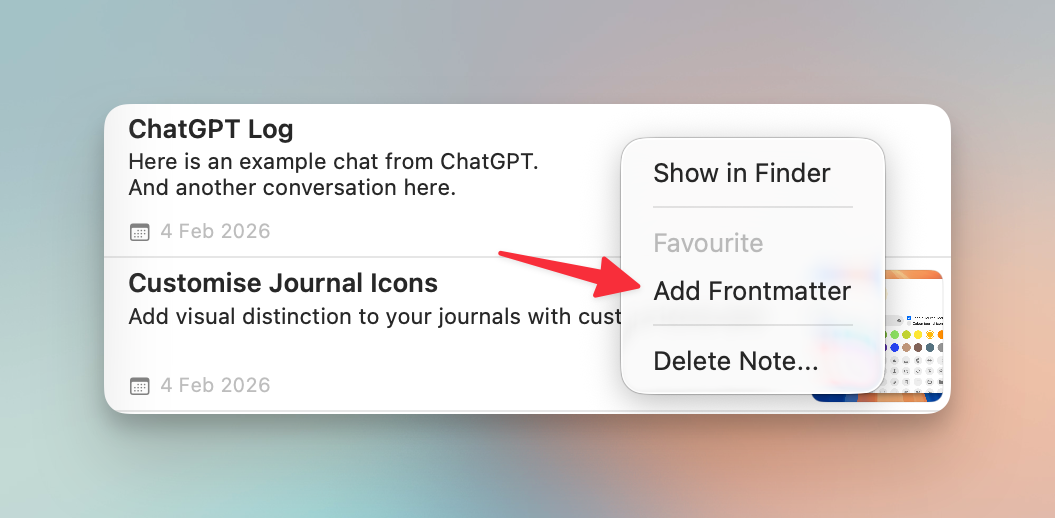
Once Frontmatter is added, you can tag the file, mark it as a favourite, and use all other MinkNote features.
Viewing and Editing Frontmatter
By default, Frontmatter is hidden to keep your notes clean. Additionally, Frontmatter only appears in Markdown view.
If you need to view or manually edit the Frontmatter:
- Right-click a note in the Note List and choose Show Frontmatter.
- The option toggles to Hide Frontmatter to hide it again
This allows you to see and edit the metadata block at the top of your notes.
Why Tags And Favourites Depend On It
MinkNote stores tags in Frontmatter. Because of that:
- tags cannot be used unless a document has Frontmatter
- favourites also cannot be used unless a document has Frontmatter
If a note was created outside MinkNote or imported from another app, it may not have Frontmatter yet. The note can still open and edit normally, but tag and favourite features will stay unavailable until Frontmatter is added.