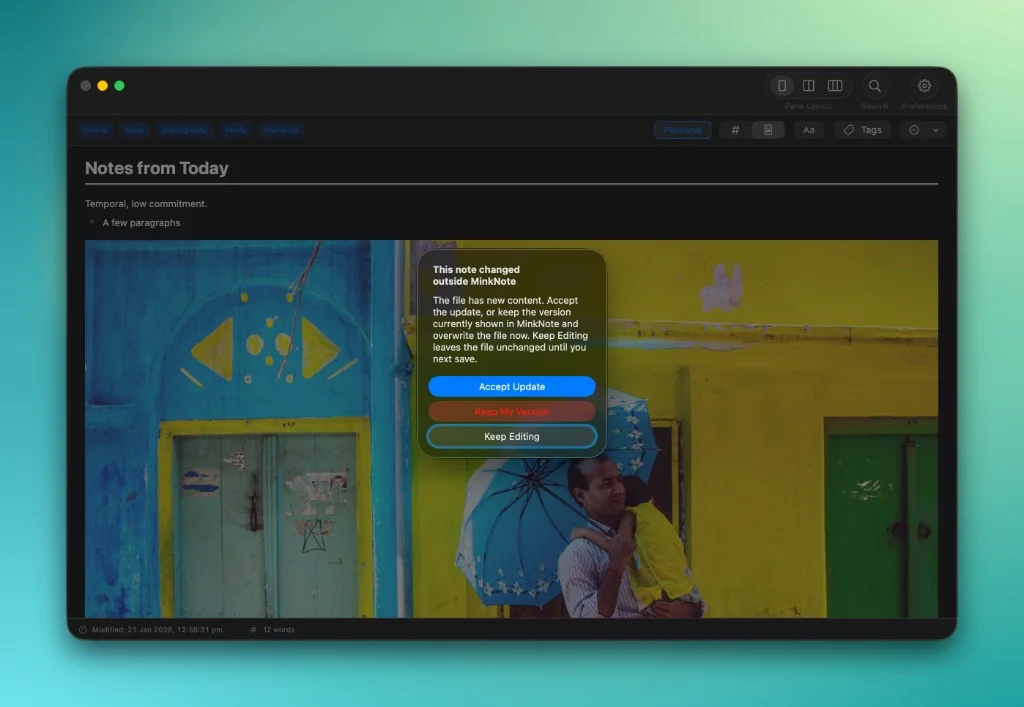
Your notes are ordinary Markdown files, so you're free to edit them outside MinkNote whenever you like. If another app, tool, or AI agent changes a note you have open, MinkNote notices and lets you decide which version to keep. Your work is never silently replaced.
Your notes belong to you, and MinkNote doesn't expect to be the only app that touches them. Open a Markdown file in another editor. Change it with a command-line tool. Let an AI agent work on it. MinkNote is designed to work comfortably alongside them.
When a note you have open changes somewhere else, MinkNote notices. Rather than quietly replacing what you're working on, it lets you choose what happens next. You can accept the updated file, keep your changes, or simply carry on editing and decide later.
MinkNote also checks that nothing has changed again before replacing anything. If there's a newer version by the time you make your choice, you'll get the chance to review that instead.
The same protection applies when your notes live in iCloud Drive. If a file isn't temporarily available on your Mac, MinkNote keeps the note you're working on and leaves your unsaved changes intact.
Most of the time, you won't need to think about any of this. MinkNote watches open notes automatically. It's simply there when you need it, giving you the freedom to work with your files wherever and however you choose.